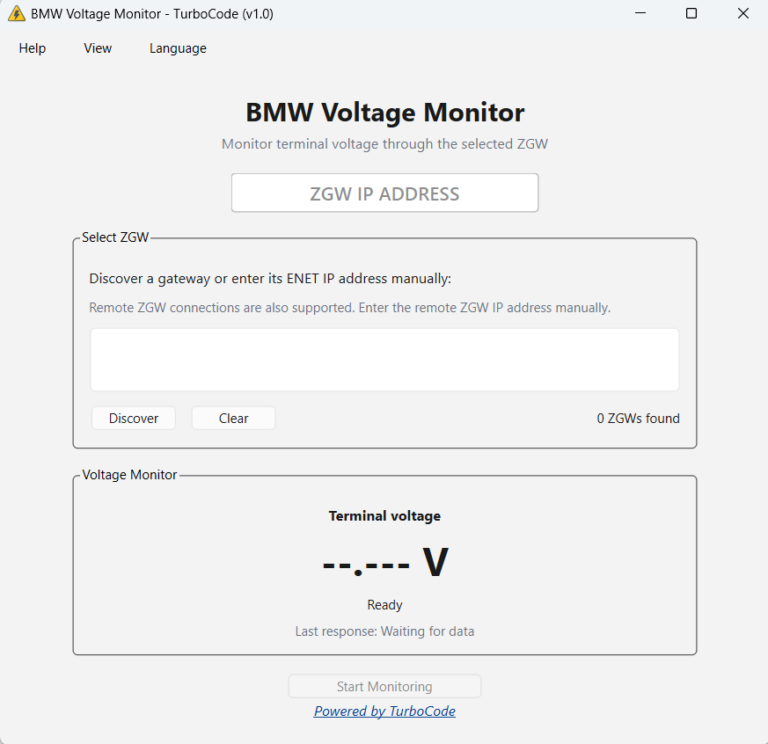
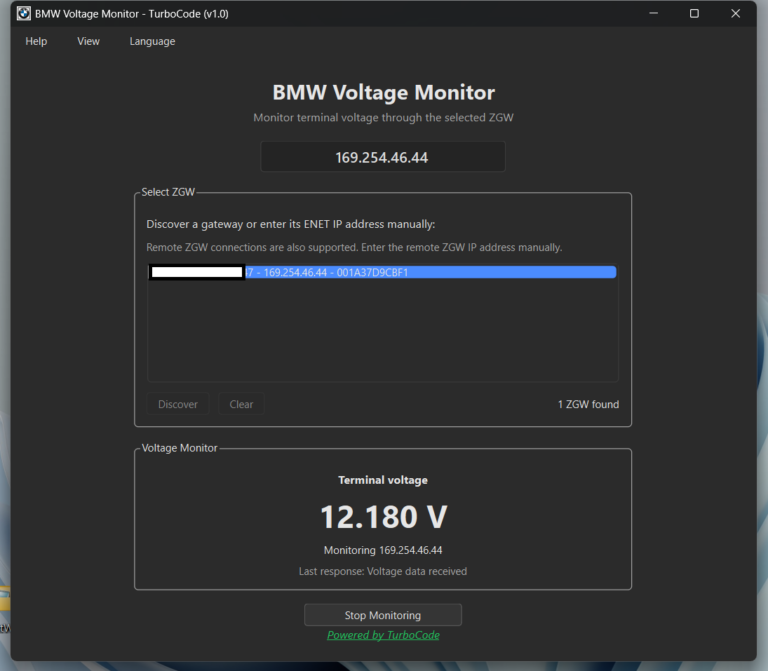
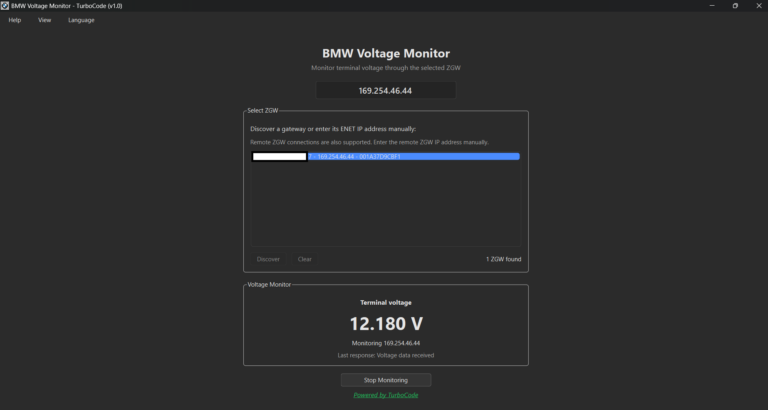
BMW Voltage Monitor is a free Windows application designed for BMW coding, diagnostics, programming preparation, and professional workshop use.
The application connects directly to the vehicle’s ZGW (Central Gateway) through ENET and continuously displays the current terminal voltage in real time.
Whether you are coding modules, performing diagnostics, or working with BMW electronics, BMW Voltage Monitor makes it easy to keep an eye on vehicle voltage without switching between applications or connecting additional diagnostic hardware.
Key Features
Live Voltage Monitoring
Continuously monitor your BMW’s terminal voltage through a clean, easy-to-read interface.
The voltage display updates automatically, making it easy to observe changes while working on the vehicle.
Automatic ZGW Discovery
The application can automatically discover the BMW Central Gateway (ZGW) when connected to the vehicle through ENET.
Manual IP address entry is also available for situations where automatic discovery is not suitable.
Wired / ENET Connection
Connect directly to your BMW using a standard ENET cable.
The application communicates with the vehicle gateway without requiring additional diagnostic interfaces or specialized hardware.
Remote ZGW Monitoring
Monitor vehicle voltage remotely by connecting to a ZGW accessible through a compatible remote ENET setup, including TurboCode Proxy.
This is especially useful for remote coding, technical support, and professional diagnostic workflows.
Works Alongside E-Sys
BMW Voltage Monitor is designed to operate alongside BMW E-Sys, allowing you to keep voltage information visible while performing your normal coding or diagnostic work.
There is no need to constantly switch between applications just to check the current voltage.
Automatic Reconnection
If communication with the vehicle is interrupted, the application automatically attempts to restore the connection.
This helps maintain continuous voltage monitoring during longer work sessions.
Simple and Lightweight Interface
BMW Voltage Monitor focuses on providing essential information without unnecessary complexity.
Key benefits include:
Live terminal voltage display
Automatic and manual ZGW connection
Local and remote ENET support
Automatic communication recovery
Compatibility with E-Sys workflows
No additional diagnostic hardware required
No VIN locking
No per-vehicle activation
Completely free to use
Simple Guided Workflow
1. Connect to Your BMW
Connect your Windows computer to the vehicle using a standard BMW ENET cable.
For remote monitoring, establish a compatible remote ENET connection.
2. Select the Vehicle Gateway
Allow BMW Voltage Monitor to automatically discover the available ZGW or manually enter the gateway IP address.
3. Start Voltage Monitoring
Start monitoring to display the current terminal voltage in real time.
The application continues updating the voltage reading while you work with other BMW software.
Designed for Professional BMW Work
BMW Voltage Monitor is developed for anyone who regularly works with BMW vehicle electronics.
It is particularly useful for:
BMW coding specialists
Retrofit professionals
Diagnostic technicians
Automotive workshops
Remote coding providers
Automotive electronics specialists
BMW enthusiasts
The application provides a simple way to monitor voltage during coding, diagnostics, module configuration, and other technical operations.
Free Software, No Vehicle Restrictions
Unlike diagnostic solutions that require paid licenses or additional hardware, BMW Voltage Monitor is available completely free of charge.
Free download – No purchase required
Unlimited vehicles – No VIN restrictions
No activation fees – No per-vehicle charges
No subscription – No recurring payments
Direct ENET communication – No additional diagnostic software required
Local and remote support – Suitable for workshops and remote coding
BMW Voltage Monitor is designed to be a practical addition to your existing BMW software toolkit.
Requirements
Wired / ENET Connection
For direct vehicle monitoring, you will need:
Windows computer
BMW ENET cable
Supported BMW vehicle with an accessible ZGW
Stable connection between the computer and vehicle
Remote Connection
For remote voltage monitoring, you will need:
Windows computer
Supported BMW vehicle with an accessible ZGW
Compatible remote ENET connection, such as TurboCode Proxy
Network access to the remote vehicle gateway
No installation of ISTA, EDIABAS, Tool32, or E-Sys is required to use BMW Voltage Monitor.
Frequently Asked Questions
Is BMW Voltage Monitor free?
Yes. BMW Voltage Monitor is completely free to download and use.
There are no subscription fees, VIN restrictions, or per-vehicle activation charges.
What do I need to use BMW Voltage Monitor?
You need a Windows computer, a compatible BMW vehicle, and an ENET connection.
No additional voltage-monitoring hardware is required.
Does BMW Voltage Monitor work alongside E-Sys?
Yes. The application is designed to operate alongside E-Sys, allowing you to keep the voltage display visible during coding and diagnostic work.
Can I monitor vehicle voltage remotely?
Yes. BMW Voltage Monitor supports connections to remotely accessible ZGW gateways through compatible remote ENET setups.
This makes it useful for remote coding and technical support.
Does the application automatically detect the vehicle?
Yes. When connected locally through ENET, the application can automatically discover the available BMW ZGW.
Manual IP address entry is also supported.
Is BMW Voltage Monitor locked to one vehicle?
No. There is no VIN locking or per-vehicle activation.
You can use the application with multiple supported BMW vehicles.
Do I need ISTA, EDIABAS, Tool32, or E-Sys installed?
No. BMW Voltage Monitor communicates directly with the vehicle gateway through ENET.
Additional BMW diagnostic or coding software is not required.
What happens if the connection is interrupted?
The application automatically attempts to reconnect to the vehicle gateway and resume voltage monitoring.
Does BMW Voltage Monitor modify vehicle settings?
No. BMW Voltage Monitor is designed exclusively for monitoring vehicle voltage.
It does not perform coding, programming, or configuration changes.
Can BMW Voltage Monitor replace a battery charger or power supply?
No. BMW Voltage Monitor only displays voltage information and does not stabilize or supply power to the vehicle.
A suitable automotive power supply should still be used whenever required for coding, programming, or other voltage-sensitive operations.